

 SOLUTION · CLOUD ERP
Dynamics 365 Finance & Operations
The cloud ERP that unifies finance, SCM, production, and projects — and the core platform that serves as the execution foundation for Agentic AI.
We explain system coverage for ERP project success from the customer's perspective, and D365 F&O's capabilities from an Agentic AI perspective.
A cloud ERP that unifies finance, SCM, production, and projects — and the execution foundation for Agentic AI.
Microsoft's Unified Platform Overview
ERP doesn't operate as an isolated system — it's part of a platform where business data, productivity, low-code development, and analytics are all connected into one.
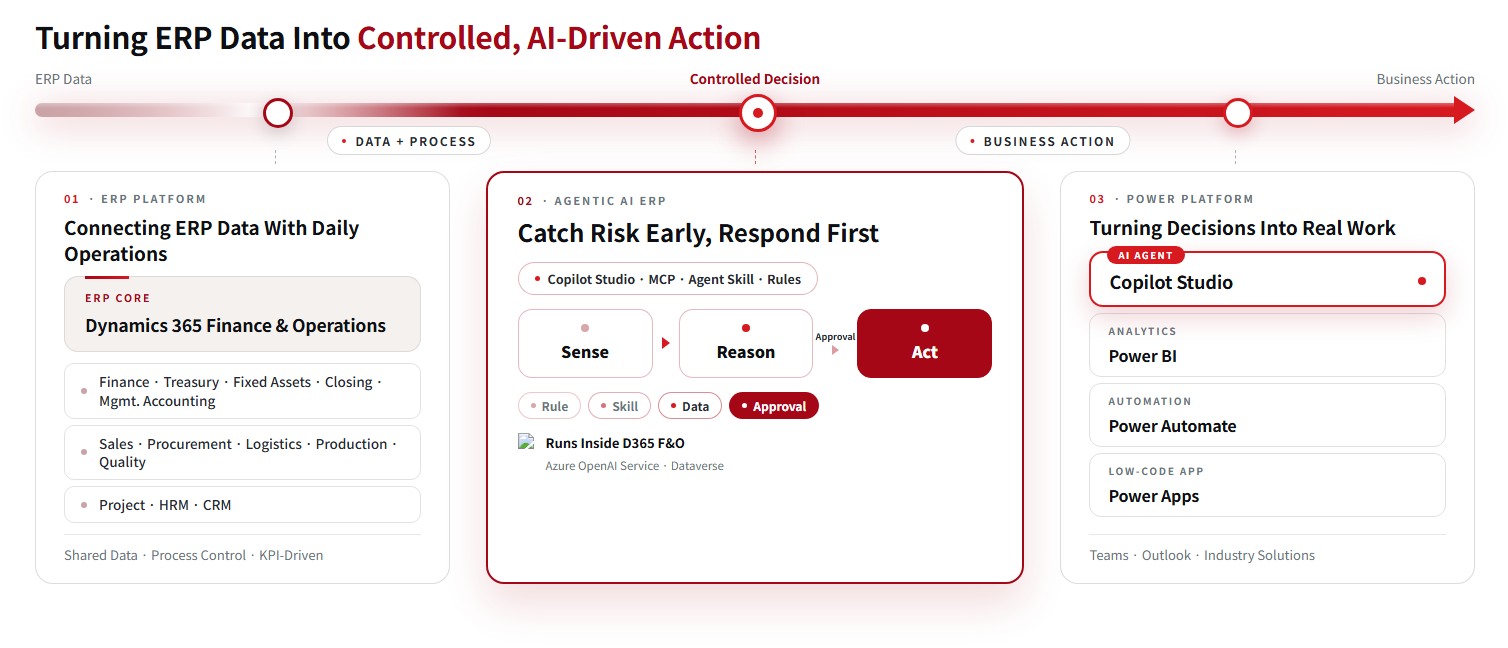
ERP, CRM, BI, automation, and AI share a single data layer, so data stays connected without building separate interfaces between systems.
The Business Scope Covered by Dynamics 365 F&O
Finance, supply chain, production, logistics, retail, HR, and projects all run on a single data model. Start with the areas you need and expand in stages.
Finance & Cost Management
- General Ledger
- Accounts Receivable / Accounts Payable (AR / AP)
- Cash & Bank Management
- Consolidation
- Budget Planning & Control
- Compliance Management
Supply Chain Management
- Inventory Management
- Demand Forecasting
- Multi-site Advanced Warehouse Management
- Order Promising
- Distribution Planning
- Quality Management
- Master Planning & Scheduling
Production Management
- Lean / Process / Discrete Manufacturing
- Product Configuration (MTO option-based production, BOM)
- Shop Floor Management
- Production Orders & Scheduling
- Engineering Change Notice (ECN)
- Asset Management
Procurement & Sourcing
- Direct / Indirect Procurement
- Purchase Requisitions
- Request for Quotation
- Supplier Relationship Management (SRM)
- eProcurement
- Supplier Self-Service Portal
Warehouse & Transportation Management
- Integrated Data Capture / Barcode
- Workflow & Process Optimization
- Real-Time Inventory Visibility (License Plate)
- Advanced Allocation & Store Replenishment
- Delivery Planning, Routing & Freight Management
- Inbound Appointment Scheduling
Retail
- POS & Assisted Sales
- Centralized Store Management
- eCommerce & Social Commerce
- Omnichannel Management
- Order Management, Fulfillment & Payment
- Merchandising & Catalog Management
- Call Center (Sales Orders)
Sales, Service & Marketing
- Sales Activities & Marketing Automation
- Lead & Opportunity Management
- Sales & Case Management
- Service Management
- Rebate & Loyalty Management
- Trade Allowance Management
- Dynamics CRM Connector Integration
Human Resources
- Core Human Resource Management
- Talent Management
- Workforce Management
- Travel, Expense & Time Management
Project
- Project Accounting & Progress Billing
- Grants Management
- Project Cost Control
- Work Breakdown Structure (WBS)
- Microsoft Project Integration
Embedded Power BI
- Power BI-Based Visualization & Ad Hoc Analysis
- Share & Access Insights From Any Device
- SQL Server Reporting Services Standard & Analytical Reports
- Role-Tailored Dashboards
- Predefined Analytical Data Cubes
- Charts & KPIs
Production Management Capabilities for Manufacturers
D365 F&O supports four production modes in a single system. Mixed environments that combine several modes also run as standard functionality.
Discrete Manufacturing
Discrete — Based on individual units and BOMs. The standard approach for assembly and machining manufacturers.
Process Manufacturing
Process — Formula (recipe)-based production for batch and semi-continuous processes. Supports by-products, co-products, and batch attribute management.
Lean Manufacturing
Lean — Supports flow-based production using Kanban and JIT.
Mixed-Mode Manufacturing
Mixed-mode — Combines the modes above. Manages different approaches by business unit or item, all within a single ERP.
Production Strategy — MTS · MTO · CTO · ETO
The right strategy depends on where the customer order enters production (the decoupling point). D365 F&O supports all four strategies and can be configured differently by item.
Forecast-driven production followed by stock replenishment. Shortens lead times, but hinges on demand forecast accuracy.
Production starts after the customer order is confirmed. Reduces inventory burden but extends lead time.
Semi-finished goods are produced to forecast, and final specifications are configured to order using Product Configuration.
Custom production that starts with design for each order. Lead time is longest, making engineering change management critical.
Shop Floor Control — A Dedicated App for the Shop Floor
Production results are logged through a dedicated app built for shop-floor workers, not an office screen. A touch-based interface handles job start, completion, and pause, and updates flow into production orders and cost immediately upon entry.
- Logging shop-floor results — job start, completion, pause
- Time tracking by worker and by asset
- Recording material input and output quantities
- Defect/nonconformance handling linked to quality inspection
- Automated results collection via MES and smart-factory edge integration
- Immediate reflection in WIP and cost variance upon entry
Source — Based on Microsoft Learn product documentation and Dynamics 365 Supply Chain Management feature documentation (2026). Actual applicable scope varies by customer environment and licensing.
Three Benefits From a Finance Perspective
Cash flow forecasting and rule-based financial operations secure business continuity — the three pillars are Performance · Protection · Purpose.
Optimized Financial Operations
Measure performance with real-time financial analysis, gain insight through cash flow forecasting, and strengthen proactive rule-based internal audit capability.
- Visualize financial data closely tied to business performance to secure key decision-making insight
- Support efficient cash management through effective cash flow monitoring and forecasting
- Integrate core business processes with the accounting system to measure performance by operating unit, centered on contribution margin
Financial Integrity Through Rule-Based Expenditure
Budget control increases visibility into spending, and a receipt-free expense system strengthens the integrity of transaction data.
- Gain cash flow visibility through budget planning and control, and share proactive alerts at threshold overages for transparent spending within budget limits
- Establish transaction entry by the cost-incurring department as the rule under a receipt-free system, with validation as a qualified transaction
- Set rules by type of expenditure to proactively detect spending that doesn't align with purpose and rule
Performance Analysis & Monitoring
Financial statements can be configured and implemented at the user level for a variety of purposes, with tracking down to the originating transaction.
- Measure contribution margin by organization, business partner, and item, with multi-dimensional simulation analysis identifying the items, business partners, and personnel that actually generate contribution margin
- Strengthen cost allocation integrity through activity-based costing, and enhance cost analysis capability with item-level cost of manufactured goods statements
- Gain performance analysis and insight through purpose-specific financial statement configuration and monitoring
Three Benefits From a Supply Chain Perspective
As an Agentic AI ERP, AI, automation, and BI are integrated to raise user productivity and support the business's continued growth.
Stronger Progress-Monitoring Capability
- Monitor quantity and on-time receipt risk with Supply Risk Assessment
- Rank suppliers based on performance measurement
- Maintain optimal inventory levels through real-time operational inventory visibility and automatic replenishment order generation
- Analyze historical shipment patterns with AI in MTS environments to generate future forecasts
- Forecast demand through Demand Driven Planning in MTO environments
Greater Agility in Business Processing
- Collect and log production results in real time, and improve on-time delivery rate through demand-linked production plan updates
- Automate production result logging via interfaces with smart-factory edge points or MES systems
- Automatically assess whether purchase order delivery-date change requests will disrupt production or shipping using AI-based impact analysis, and guide the accept/reject decision
Cost Minimization
- Compare and analyze manufacturing cost details by item to identify waste factors and support ongoing cost improvement
- Improve equipment efficiency and extend asset life through equipment-level operation monitoring and preventive activities
- Reduce inventory carrying costs through ordering based on customer demand analysis and optimal inventory calculations
Supporting Rational, Data-Driven Decisions Inside ERP
Power BI serves as the bridge from data to decision.
Insight Wherever Decisions Are Needed
Role-based Power BI reports are added directly into the D365 ERP workspace, so every user gains fast insight from within the ERP operating environment. Reports monitoring organization-wide KPIs and operational status establish a data-driven decision-making framework. AI capabilities like anomaly detection, natural-language Q&A, and key influence analysis make it easy to spot hidden patterns, opportunities, and problems in the data.
Uses All Data Across the Organization
Power BI's Dataverse connector simplifies ERP data integration and visualization to monitor real-time operating results. It consolidates data generated across multiple Dynamics 365 platform solutions into a single view of performance by customer, product, and supplier. With Azure Synapse Link for Dataverse, you can also apply Machine Learning without constraints to gain further insight.
Runs Immediately After Implementation
Pre-built BI report templates apply to the workspace and other screens without separate development. One click on "Visualize this view" auto-generates an intuitive visual report, and viewing ERP data in Teams and communicating through interactive Power BI reports raises productivity and collaboration.
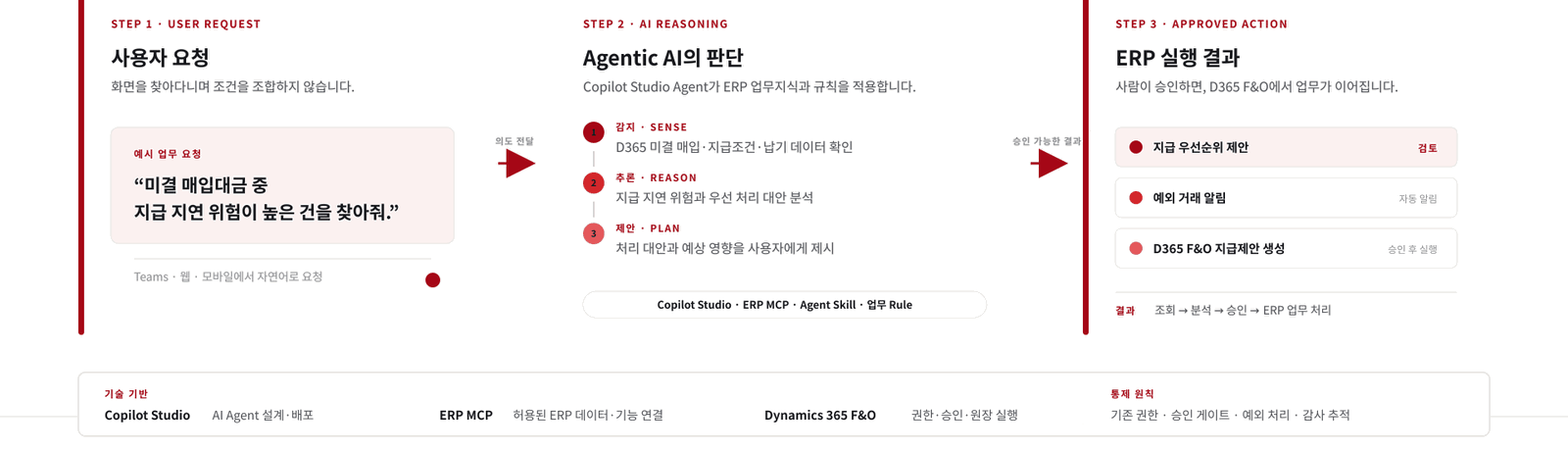
A Single Request From a User Becomes Completed ERP Work
Copilot Studio understands the intent behind a request and connects to D365 F&O's data and functions through ERP MCP. AI proposes the judgment; a person approves the final decision.
Improvement Metrics Targeted by Business Process
When defining implementation scope, we use these metrics as the basis for setting priorities and performance goals together.
Shortening close lead time in the record-to-report process
Improving on-time, full delivery in the inventory-to-delivery process
Improving inventory efficiency through better planning accuracy
Demand forecast precision in the forecast-to-plan process
Profitability management in the order-to-cash process
Shortening recovery time from breakdown to normal operation
Improving good-unit output and equipment uptime
Improvement through per-project cost and revenue tracking
An Environment Where Frontline Staff Learn Fast and Make Fewer Mistakes
The Same Experience as Office
The same UI layout as the Office ribbon means less to learn. Users can start working right away in a familiar screen.
Upload Directly From Excel
Uploads follow D365's table structure flexibly, not a fixed template. Data is entered after field-level validation.
Role-Centered Workspaces
Screens are organized around the job at hand rather than a list of features. Key items are laid out as tiles, and the system suggests what to work on next.
Task Recording & Guidance
Standard processes are recorded to auto-generate manuals, and the recorded steps guide users on screen to reduce input errors.
Analytics Built Into the Workspace
Role-based Power BI reports are embedded directly in the ERP screen, so users check status without switching to a separate tool.
Unified View of Enterprise Data
The Dataverse connector and Synapse Link monitor performance by customer, product, and supplier in a single screen.
Adapting Global ERP for Korean Operations
Korea Local Pack — VAT and Management Accounting
We provide reverse-issued e-tax invoices, Hometax e-filing, and NTS data reconciliation — requirements a global standard ERP doesn't cover — as a standardized Local Pack. It also implements Korean management accounting practices such as activity-based costing and contribution-margin-focused profitability analysis. Because it's managed as a standard module rather than one-off customization, it stays stable through version upgrades.
Learn more about Korea Local Pack Implementation services →
Solutions Worth Exploring Together
Copilot Studio
Design task-oriented agents in natural language and deploy them to Teams and web channels. Connects directly to ERP via MCP.
Learn MorePower BI
Visualizes KPIs and exception/risk signals so people and AI Agents make decisions on the same data.
Learn MorePower Automate
Automates approvals, notifications, repetitive tasks, and system integration to turn AI's judgment into actual business workflow.
Learn MorePower Apps
Builds field-ready business apps quickly with low-code and extends them to mobile and portals.
Learn MoreWhich Modules Does Your Company Need First?
An upfront business diagnosis analyzes your current processes and lays out implementation scope and roadmap.